
For teams whose agents act on documents
Your agents act on what is proved. The rest is held.
Every value cites its page. Anything unproved waits for your expert, one keystroke away.
No card needed.
The document, page 1
COMMERCIAL INVOICE
Invoice No: INV-4102
Seller: Kowloon Knits Ltd., Busan
Buyer: Northbound Goods Co., Tacoma
Ship by 20 Oct, or 24 Oct if the vessel is delayed.
Total due: USD 12,480.00
What your agent gets back
- Invoice numberINV-4102proved
- SellerKowloon Knits Ltd.proved
- ImporterNorthbound Goods Co.proved
- TotalUSD 12,480.00proved
The invoice gives two dates.
Built for your experts
The people who know the documents fix the rules themselves.
No code, no prompt to edit and no ticket to an engineer. Your reviewers and subject matter experts work in one place, in plain words, with the page in front of them.
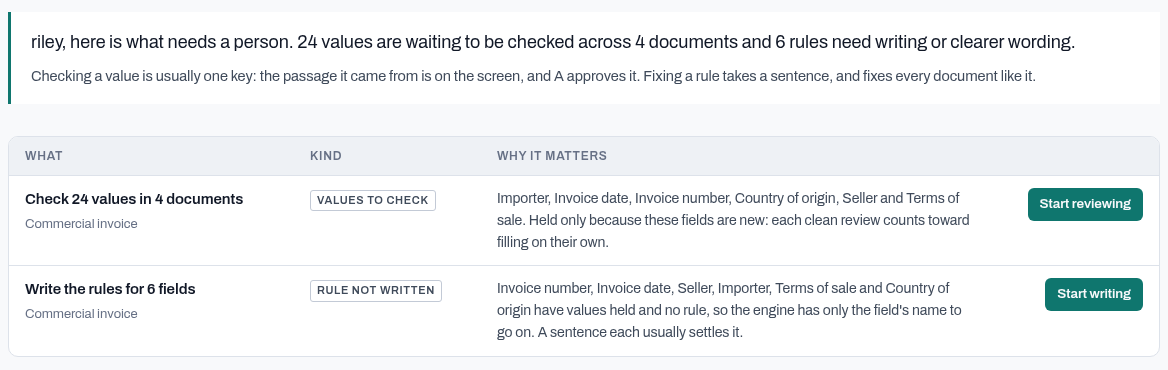
1. Open it
See what needs you, and nothing else
One list of everything waiting for a person: values to check, rules nobody has written, changes to approve. One button each, ordered for your role, so a reviewer starts on values and an expert starts on rules.
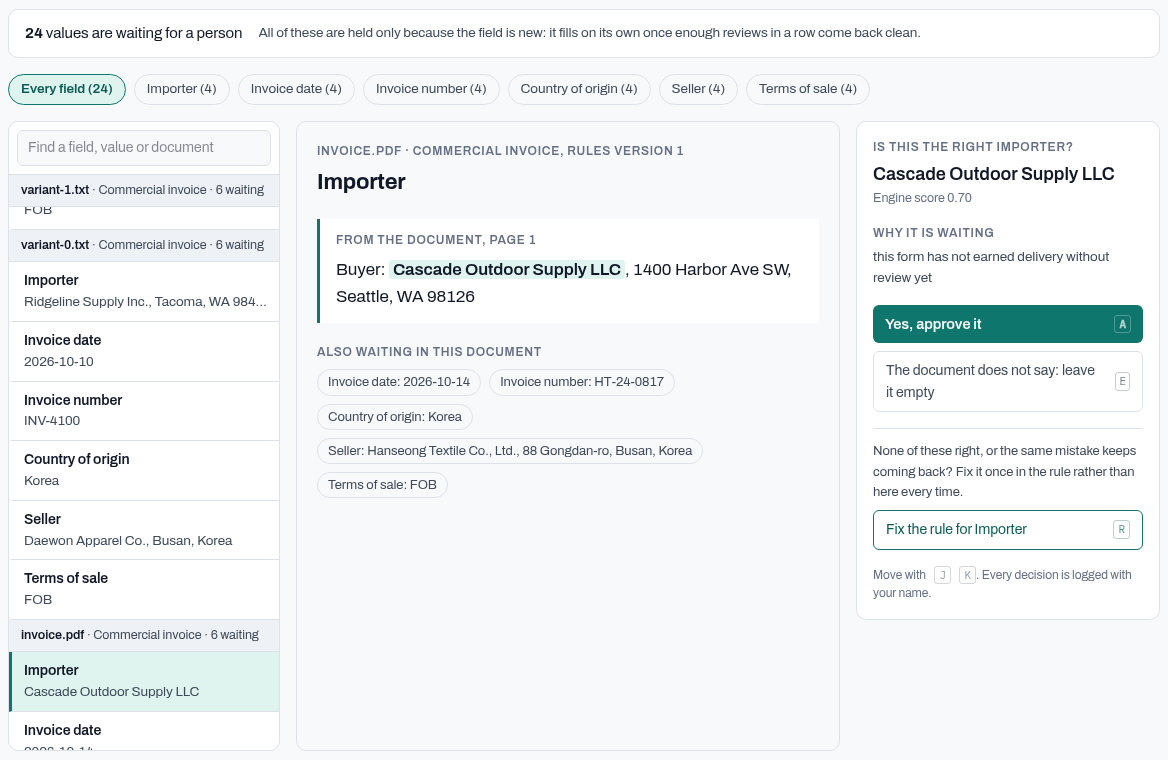
2. Check a value
One key, with the page in front of you
The sentence the value came from is on the screen, with the value marked. A approves it, a number picks another value the document offers, E leaves it empty, and the next one opens on its own. There is no box to type into, so nothing gets invented.
3. Fix a rule
A sentence, not a ticket
Each field shows where it goes wrong, with the quotes. Say in plain words what it means and what it is not. Before anything changes, your wording is tested on documents already read, and your developer accepts it with one click.
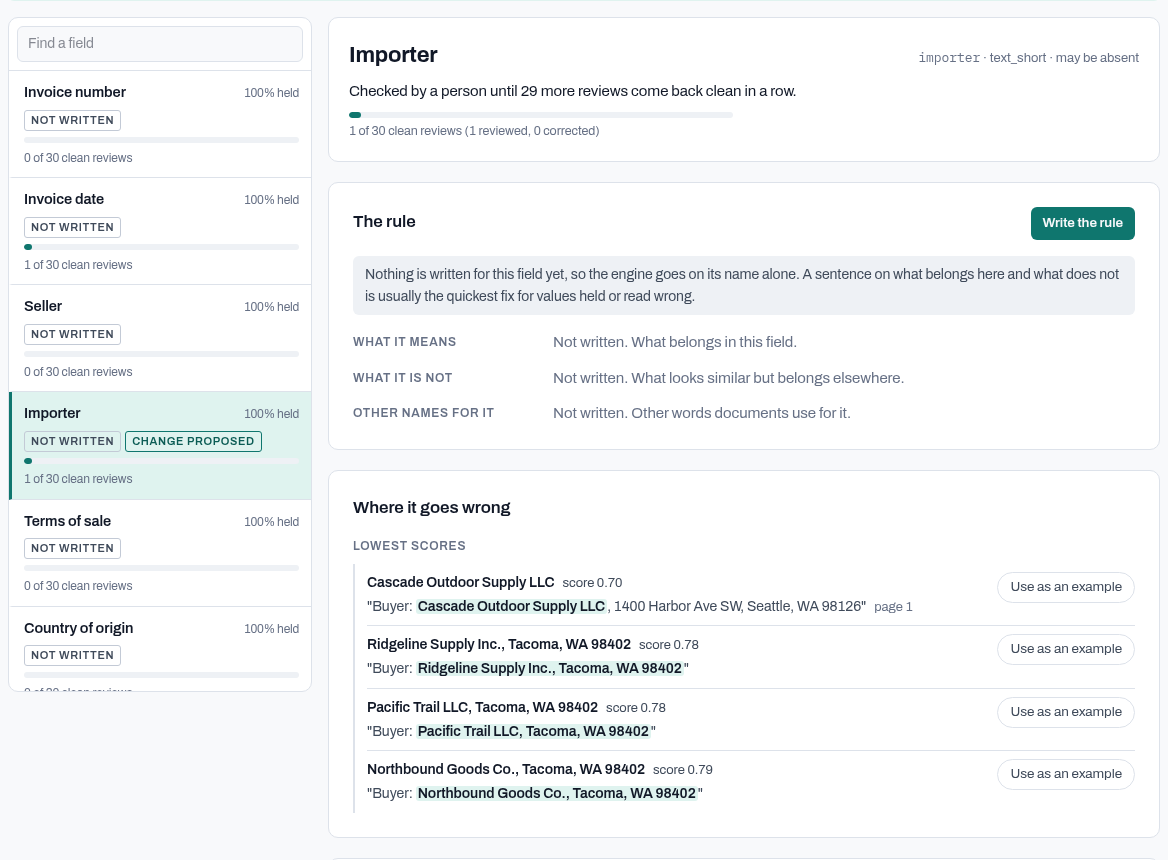
Screens from the product, on a sample commercial invoice. Review and rule changes are included on every plan.
How it works
Three steps
- 1Once
Set the rules in one place
Your developer sets the schema in code once: a JSON schema, a sample record, a Postgres table or a form you already use. Your expert says what each field means and what counts as proved. Every agent that calls fastsift is held to the same rules.
- 2Every call
Your agent calls fastsift
Mid-workflow, your agent sends the document over the API against the schema you registered. It gets back typed values, each with a state: filled, needs review, conflict or not found. With evidence on, each value also carries the quote and page it came from. Nothing is invented: a fact that is not there comes back empty and says so.
- 3Every record
Your agent acts on what is proved
It carries on with the proved values and stops on the held ones, which wait for a person with the sentence behind them. Each fix can become a rule, so the next call holds less.
The review loop
Held values go to a person. Their fixes come back as rules.
Your agent never has to guess past a held value. Other tools show a person the values they were least sure about; fastsift shows the values it refused to hand your agent, with the page behind each one.
1. fastsift
Holds what it could not prove
A value with no sentence behind it is never handed to your agent as a fact. It comes back held, with the quote it found, the page and the reason, and waits for a person.
2. Reviewer
Resolves it with the page open
Approve it with one key, pick another value the document offers, or leave it empty. Every decision is kept, with the name of the person who made it.
3. Subject matter expert
Says what the rule should be
When a field keeps getting held for the same reason, the person who knows the documents proposes a change to what that field means.
4. Developer
Accepts it in code
The change arrives as a diff against your schema. Accept it or reject it. The schema stays yours, and both names stay on the record.
2% 10, net 30 days from date of invoice.
Held: a close call between net_30 and early_pay_discount
Reviewer
Approved net_30. Recorded with their name and the time.
Proposed rule change, for the developer
  payment_terms.not_for:
-   ""
+   "A discount for paying early. That is a separate field."
The schema changes only when your developer accepts it.
Use cases
Wherever a record starts as a conversation or a document
The guarantee is the same every time. What changes is what goes in and the target it fills.
Sales calls
Call transcripts become the fields your schema declares - stage, amount, close date and next step - each value proved from the transcript or held.
Support calls
Transcripts and emails become case and ticket fields, ready for your queue.
Legal documents
Contract PDFs become parties, effective dates, renewal dates, fees and governing law.
Insurance
Claims and policy documents become the structured fields your adjusters work from.
Recruiting
Resumes and interview notes become complete candidate records.
Real estate
Leases and listings become property records, with terms and dates in the right columns.
And anywhere else a form has to be filled from what someone wrote or said, from medical encounter notes to internal reports.
Targets and delivery
Bring your structure. Send the record anywhere.
The record is finished and checked first. Delivery comes after, and it cannot change what was approved.
What it fills
JSON Schema
Fields, types and allowed values, as written.
Sample JSON
One example record, as a draft to confirm.
Postgres table
A CREATE TABLE, with its keys and limits.
Form
The fields and options of a form you already use.
Where it goes
Signed webhook
The default. Your endpoint gets the record, signed so you can verify it.
REST API
Any system that accepts structured data, mapped field by field.
Postgres
Rows written in one transaction, then read back.
SaaS apps through Composio
Sign in to your apps once. Composio holds the credentials and refreshes them, so they never pass through fastsift.
HubSpot
Direct to your CRM, with each write read back.
Why fastsift
Why not let the agent's own model read it?
Because a record that is nearly right is worse than one left empty.
| compared | A model on its own | fastsift |
|---|---|---|
| What the agent acts on | Whatever the model said | Only values proved by a quote and page |
| The values | Writes an option your form does not have | Picks from what your target allows, or asks |
| Missing facts | Fills the gap with a plausible guess | Leaves it empty and says so |
| Two answers | Picks one and does not mention the other | Holds both for a person |
| Proof | A value, and no reason | The sentence it came from |
| Fixing a wrong answer | An engineer rewrites the prompt | Your expert writes a sentence, tested before it goes live |
| After writing | Assumes it landed | Reads it back and reports any difference |
Trust
You stay in control
- A new target holds every field for a person until it has earned trust.
- Anything unsure waits for a person instead of being guessed.
- A sensitive field is held for review, however confident the read.
- Every value traces to an exact quote from your document.
- If a live table no longer matches its target, delivery stops.
- A retry carries the same id, so a receiver can spot a repeat.
Start free, then pay as you go
No card to start. Top up from $5 when you are ready.
FAQ
Questions
- What can it fill?
- Anything with a structure: a JSON schema, a sample record, a Postgres table or a form. The CRM is one target among many, and your structure stays yours.
- Do I need to code?
- The expert and the reviewer never write code. The expert says in plain words what a field means and what counts as proved, and the reviewer approves, corrects or leaves empty each held value with its quote and page in front of them. Your developer sets the schema in code once: the fields, types and allowed values. Every value is held to it. The guide covers the API and signed webhook for building against it.
- How accurate is it?
- That depends on your documents, so we do not quote one number. It holds back what it is unsure of rather than guessing, and every field shows the sentence it rests on, so you can check it in a second. Start by reviewing everything, and trust it field by field.
- Where does it sit in my agent workflow?
- In the middle. You register the schema once, then your agent sends each document to the fastsift API and gets back a record with a state on every value. It acts on the filled ones and routes the held ones to review, where a person resolves them with the quote and page in front of them. A retried request id is charged once, so an agent can retry safely.
- Can someone who is not an engineer change the rules?
- Yes, for the part that matters: what counts as proven for a document family. Your engineer brings the schema once. From then on the reviewer works the held fields with the quote and page in front of them and proposes the rule where it is wrong, and your engineer accepts it. We are not selling a workflow builder. If you need routing, approvals and an integration catalogue, an IDP platform is the right tool.
- What happens to my documents?
- They are read to fill your target. What is kept, for how long and who else handles it is set out on the privacy page.